

Why PCI DSS Vulnerability Scanning Matters for Website Security

Website security is an important responsibility for businesses that handle online transactions and sensitive customer information. Security vulnerabilities can expose systems to unauthorized access, data theft, and other cyber threats, making regular security assessments an important part of maintaining a reliable online presence.

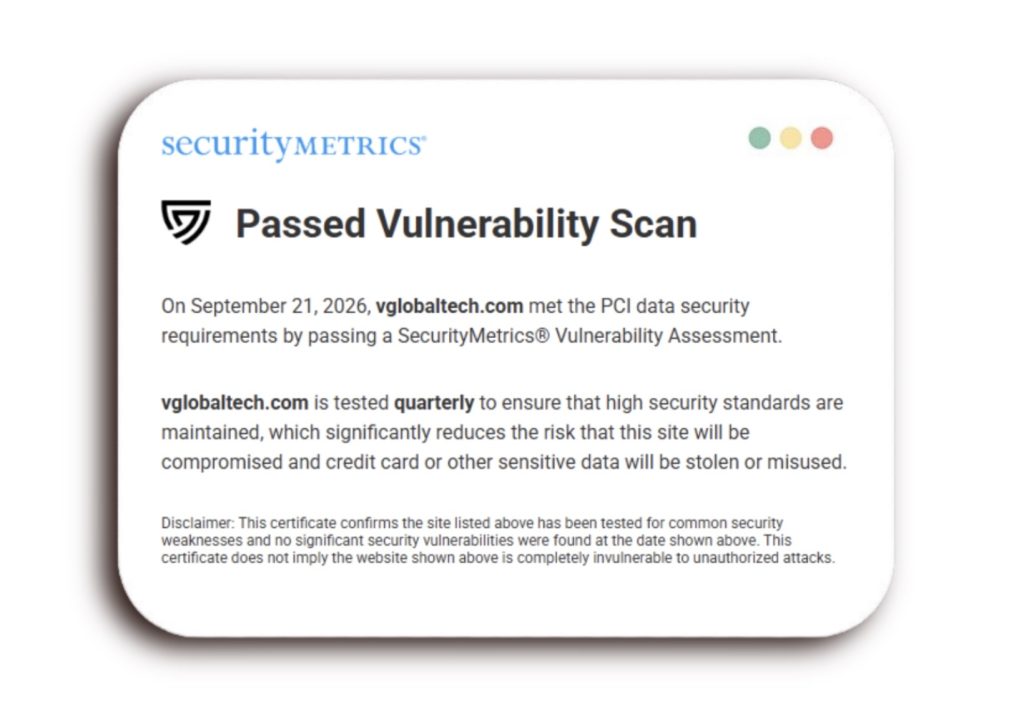
At VGlobalTech, we recognize the importance of protecting our digital infrastructure. On September 21, 2026, VGlobalTech.com successfully passed a SecurityMetrics vulnerability assessment, demonstrating our continued commitment to identifying security risks and maintaining responsible website security practices.


What Is PCI DSS?

The Payment Card Industry Data Security Standard (PCI DSS) is a set of security requirements designed to protect payment account information. Developed and maintained by the PCI Security Standards Council, PCI DSS establishes technical and operational requirements for organizations that store, process, or transmit cardholder data.

These requirements cover several important areas of information security, including network protection, access controls, vulnerability management, monitoring, and security testing.

For businesses that accept credit or debit card payments, understanding applicable PCI DSS requirements is an important part of managing payment security risks.

What Is a PCI DSS Vulnerability Scan?

A PCI DSS vulnerability scan is a security assessment designed to identify potential weaknesses in systems and networks that could be exploited by attackers.

External vulnerability scans examine internet-accessible systems for known security risks, such as outdated software, insecure configurations, and certain network vulnerabilities.

Under applicable PCI DSS requirements, organizations must perform regular vulnerability scans and address identified issues. Some external scans must be conducted by a PCI Security Standards Council Approved Scanning Vendor (ASV).

A passing scan indicates that the systems evaluated met the relevant scanning criteria at the time of assessment. However, vulnerability scanning represents only one part of PCI DSS compliance and does not independently establish that an organization meets every PCI DSS requirement.

Why Regular Vulnerability Scanning Matters for Businesses

Identify Potential Security Weaknesses

Websites and their supporting systems can develop vulnerabilities as software, plugins, servers, and configurations change. Regular scanning helps businesses identify known weaknesses that may otherwise go unnoticed.

Detecting potential vulnerabilities provides an opportunity to investigate and address issues before they can be exploited.

Support Payment Data Security

Businesses that process payments must consider the security of systems involved in handling payment information.

Vulnerability assessments support these efforts by identifying weaknesses within the systems being evaluated, helping organizations reduce exposure to certain security threats.


Maintain Ongoing Security Practices

Website security requires continued attention. Software updates, new integrations, and infrastructure changes can introduce vulnerabilities even when a system previously passed a security assessment.

Regular evaluations, timely updates, and appropriate remediation help businesses maintain stronger security practices as their digital environments evolve.

Support PCI DSS Requirements

For organizations subject to PCI DSS, vulnerability scanning may be a required component of their compliance responsibilities.

Maintaining appropriate scanning schedules, addressing identified vulnerabilities, and retaining the necessary assessment documentation can support compliance validation when applicable.

VGlobalTech Successfully Passes SecurityMetrics Vulnerability Assessment

On September 21, 2026, VGlobalTech.com successfully passed a SecurityMetrics vulnerability assessment associated with PCI data security requirements.

This assessment evaluated the website’s specified systems for common security weaknesses and reported a passing result under the applicable scanning criteria.

The successful assessment reflects VGlobalTech’s commitment to regularly evaluating its digital infrastructure and maintaining responsible security practices.

While no single vulnerability assessment can guarantee complete protection against cyber threats, ongoing testing remains an important part of identifying potential risks and supporting website security.
Website Security Is an Ongoing Process

Passing a vulnerability assessment is an important achievement, but effective website security requires ongoing attention.

Businesses should regularly evaluate their website infrastructure, maintain supported software, review security configurations, and address vulnerabilities identified through testing.

Organizations that accept payment cards should also understand the PCI DSS requirements applicable to their specific payment environments and maintain appropriate validation procedures.

Taking a proactive approach to security helps reduce unnecessary risks and supports the long-term reliability of business websites.


Build a Stronger Online Presence With VGlobalTech

At VGlobalTech, we understand that a successful website requires more than an attractive design. Functionality, accessibility, and ongoing technical support all contribute to a professional digital presence.

Our services include custom web design and development, software development, ADA and WCAG accessibility solutions, search engine optimization, and digital marketing.

Whether your business is building a new website or improving an existing one, our team can help develop professional digital solutions tailored to your goals.

Ready to improve your business’s online presence?

Contact VGlobalTech to learn more about our web design, development, accessibility, and digital support services.

How to Tell If Your Website Has Accessibility Issues

A website can look professional, load quickly, and function normally for most visitors while still presenting accessibility barriers. Problems with navigation, forms, images, and interactive elements can make it difficult or impossible for people with disabilities to access important information or complete everyday tasks.

For businesses, identifying these issues is an important step toward improving usability and supporting ADA and WCAG accessibility efforts. Understanding what to look for can help you recognize potential barriers before they affect more visitors.

What Are Website Accessibility Issues?

Website accessibility issues are design, content, or technical barriers that prevent people with disabilities from using a website effectively. These barriers may affect individuals who rely on screen readers, keyboard navigation, screen magnification, or other assistive technologies.

The Web Content Accessibility Guidelines (WCAG) provide internationally recognized standards for making websites and digital content more accessible. They address how information is presented, how users navigate a website, and whether its features can be operated using different methods.

A website does not need to appear broken to have accessibility problems. Many issues require specific testing methods to identify.

5 Common Signs Your Website May Have Accessibility Problems

1. Your Website Cannot Be Navigated Using Only a Keyboard

Not everyone uses a mouse to browse the internet. Some visitors rely on a keyboard or alternative input devices to navigate websites.

If users cannot reach menus, links, buttons, or forms using the Tab key, important parts of your website may be inaccessible. Keyboard users should also be able to identify which element currently has focus and operate interactive features without becoming trapped.

2. Images and Buttons Lack Meaningful Descriptions

Screen readers help people with visual disabilities access website content by announcing text and other accessible information.

Images that communicate important information should include appropriate alternative text. Buttons and links should also have accessible names that clearly communicate their purpose.

Without these descriptions, visitors may struggle to understand images, navigate your website, or complete important actions.

3. Text Is Difficult to Read

Low color contrast, small text, and poorly structured content can create barriers for visitors with low vision or other accessibility needs.

Text should be distinguishable from its background, and website layouts should support text resizing and zooming without losing essential content or functionality.

Clear headings, readable typography, and consistent layouts also help visitors find information more efficiently.

4. Contact Forms Are Difficult to Complete

Contact forms allow potential customers to request information, schedule services, and communicate with your business. Accessibility barriers within these forms can prevent visitors from completing those actions.

Missing field labels, unclear instructions, inaccessible error messages, and keyboard navigation problems can all affect usability.

Accessible forms should communicate what information is required, identify errors clearly, and allow users to complete and submit their information using supported input methods.

5. Important Website Features Do Not Work With Assistive Technology

Dropdown menus, image galleries, pop-ups, and other interactive features may work with a mouse but behave differently with assistive technologies.

For example, a screen reader may not announce the purpose of a button, or a keyboard user may be unable to close a pop-up.

Testing these interactions helps identify barriers that may not be visible during a standard website review.

How Can You Check Your Website for Accessibility Issues?

A few basic checks can help identify potential accessibility concerns.

Start by navigating your website using only your keyboard. Check whether you can reach important links, menus, buttons, and forms without using a mouse.

Next, enlarge your browser’s content and review whether text remains readable and navigation continues to function. You can also inspect image descriptions, heading organization, and form labels.

Automated accessibility testing tools can help flag certain issues, including some missing labels and color contrast problems. However, automated scans cannot evaluate every WCAG requirement or determine whether an entire website is accessible.

Professional accessibility audits combine technical evaluations with human testing to provide a more complete understanding of potential barriers.


Why Website Accessibility Audits and Remediation Matter

Identifying accessibility issues is only the beginning. Once barriers are discovered, they need to be evaluated and addressed through appropriate remediation.

An accessibility audit examines website content and functionality against applicable accessibility standards. Findings can help businesses understand which issues require attention and guide improvements to their websites.

Remediation involves correcting identified barriers, which may require changes to website code, navigation, forms, design elements, or digital documents.

Because websites change over time, ongoing testing and maintenance are important for identifying new problems introduced through updates, added content, or third-party tools.

Improve Website Accessibility With VGlobalTech

VGlobalTech specializes in ADA & WCAG accessibility audits, remediation, and accessible web design and development.

Our team helps businesses and organizations identify website accessibility barriers, evaluate digital content, and implement improvements that support a more accessible online experience.

Through technical expertise, human accessibility audits, and ongoing support, VGlobalTech works with organizations to address accessibility concerns and improve website functionality.

Whether you’re updating an existing website or developing a new one, accessibility should be considered throughout the process.


Is Your Website Accessible to All Visitors?

Accessibility issues can affect how visitors navigate your website, access information, and connect with your business. Identifying and addressing these barriers helps create a more usable digital experience while supporting your organization’s accessibility efforts.

Take the next step toward a more accessible website.

Contact VGlobalTech to learn more about our ADA & WCAG accessibility audits, website remediation, and accessible web design services.

The Growth of Web Design

Web design has evolved significantly since the early days of the internet. What started as simple, text-heavy pages has transformed into a dynamic and interactive experience that plays a crucial role in branding, marketing, and user engagement.
The Early Days: Simplicity and Functionality
In the 1990s, websites were basic, featuring plain text, hyperlinks, and minimal graphics. HTML was the primary coding language, and web pages resembled digital brochures rather than interactive platforms. As the internet became more popular, designers began experimenting with tables, frames, and basic styling through CSS (Cascading Style Sheets).
The 2000s: The Rise of User Experience
The early 2000s brought major advancements with Flash and JavaScript, allowing for animations, interactive elements, and more engaging designs. However, Flash eventually faded due to accessibility and security concerns. The introduction of CSS3 and HTML5 revolutionized design, making websites more visually appealing and responsive across devices.
The Mobile Era and Responsive Design
With the rise of smartphones and tablets, web design had to adapt. Responsive design, which ensures that websites adjust to different screen sizes, became essential. Frameworks like Bootstrap made it easier for designers to create mobile-friendly sites without reinventing the wheel.
Modern Trends: Speed, Aesthetics, and AI
Today, web design prioritizes speed, user experience, and aesthetics. Minimalist designs, dark mode, and micro-interactions are popular trends. AI and automation also play a role in website development, with tools like chatbots and personalized user experiences becoming the norm.
The Future of Web Design
As technology advances, web design will continue to evolve. Augmented reality (AR), virtual reality (VR), and voice interfaces may shape the next generation of websites, making them more immersive and interactive than ever before.
Web design has come a long way from simple HTML pages to AI-driven, user-focused experiences. As businesses and individuals continue to rely on the internet, the demand for innovative and functional web design will only grow.